AT150CL4+ Quantity: 1
$4.99
» View Details
CGL528W Quantity: 1
$4.99
» View Details
AFA07CE Quantity: 1
$4.99
» View Details
XV-DV363/NTXJ Quantity: 1
$4.99
» View Details
JSI 6466B Quantity: 1
$4.99
» View Details
SLVE90IT Quantity: 1
$4.99
» View Details
REFERENCE1240W Quantity: 1
$4.99
» View Details
WVBL604 Quantity: 1
$4.99
» View Details
7MLSQ8543JT5 Quantity: 1
$4.99
» View Details
FC6055/02 Quantity: 1
$4.99
» View Details
NSXS212 Quantity: 1
$4.99
» View Details
SONATAFA-10 Quantity: 1
$4.99
» View Details
AGS 231/WP Quantity: 1
$4.99
» View Details
ADP 8400 WH Quantity: 1
$4.99
» View Details
KBRS21KABL00 Quantity: 1
$4.99
» View Details
KECC051HBL05 Quantity: 1
$4.99
» View Details
LAV58203 Quantity: 1
$4.99
» View Details
KXTD500SA Quantity: 1
$4.99
» View Details
AKT 476/NB Quantity: 1
$4.99
» View Details
DVR-540H-S Quantity: 1
$4.99
» View Details
CQVA707WEUC Quantity: 1
$4.99
» View Details
LPR720 Quantity: 1
$4.99
» View Details
FVS-T1000 Quantity: 1
$4.99
» View Details
BG174-4V Quantity: 1
$4.99
» View Details
NN6855 Quantity: 1
$4.99
» View Details
AKM 473/IX Quantity: 1
$4.99
» View Details
GT1SHTXMB00 Quantity: 1
$4.99
» View Details
ET25PKXBN00 Quantity: 1
$4.99
» View Details
MC 40 Quantity: 1
$4.99
» View Details
TR1230G Quantity: 1
$4.99
» View Details
GBS277PDT4 Quantity: 1
$4.99
» View Details
NT21L9A Quantity: 1
$4.99
» View Details
SV2189S Quantity: 1
$4.99
» View Details
AV20920 Quantity: 1
$4.99
» View Details
QCB831-1-W Quantity: 1
$4.99
» View Details
AVC-D5CE Quantity: 1
$4.99
» View Details
CAH18WC42 Quantity: 1
$4.99
» View Details
ED22DLXBW00 Quantity: 1
$4.99
» View Details
ET20DKXTG03 Quantity: 1
$4.99
» View Details
7MLGQ8857JT4 Quantity: 1
$4.99
» View Details
MICROSCAN 2E Quantity: 1
$4.99
» View Details
CK594~76 Quantity: 1
$4.99
» View Details
VR5943 Quantity: 1
$4.99
» View Details
P955AS Quantity: 1
$4.99
» View Details
AKZ 430/NB Quantity: 1
$4.99
» View Details
KERA807PWW01 Quantity: 1
$4.99
» View Details
US2000PROTECH Quantity: 1
$4.99
» View Details
AZ8357 Quantity: 1
$4.99
» View Details
AKM 951/G/BA/01 Quantity: 1
$4.99
» View Details
CGM2751KQ0 Quantity: 1
$4.99
» View Details
DE6865X Quantity: 1
$4.99
» View Details
Subtotal: $254.49
 
English Polski Spanish 
Buscar un manual
 

(p.Ej. AA-V20EG JVC, ZX-7 Sony)
PayPal 1000+ rating Secure, Encrypted Checkout.
 
Productos
Información
Destacado
Inicio >> HARMAN KARDON >> FL8385 Manual de Servicio
 
 51 artículo(s) en Su carrito 

HARMAN KARDON FL8385
Manual de Servicio


¡Twitee acerca de este producto y obtenga $1.00 de crédito en la tienda para uso!
  • Contiene diagramas del circuito
  • Descargable
  • Formato PDF
  • Manual completo
  • Idiomas: English
Precio: $4.99

Descripción del HARMAN KARDON FL8385 Manual de Servicio

Manual de servicio completo en formato digital (archivo PDF). Los manuales de servicio por lo general contienen diagramas de circuitos, tarjetas de circuitos impresos, consejos para reparación, diagramas de cableado, diagramas de bloque y lista de refacciones. El Manual de Servicio (a veces llamado Manual de Reparación) es usado principalmente por los técnicos.

Si tan solo quiere saber cómo utilizar su televisión, reproductor de vídeo, reproductor de mp3, etc. Quizá lo que necesita es el Manual del Propietario. Después de colocar la orden le enviaremos las instrucciones de descarga a su dirección de e-mail.

The manual is available in languages: English

Not yet ready
You must purchase it first

Opiniones de los clientes
No hay comentarios de productos.

TEXT_PDF_SNIPPET
FL8385

harman/kardon

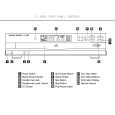
FRONT-PANEL CONTROLS
$
FL 8385

#

@
1 4 2 5 3

!)
PLAY/PAUSE

9
STOP

DISK SKIP

��

SEARCH

��

���

SKIP

���

8 7

Power

Phones

Phones Level

12

34

5

6

1 Power Switch 2 Status Mode Indicator 3 Headphones Jack 4 Headphones Level Control 5 CD Drawer

6 Open/Close Button 7 Search Button 8 Skip Button 9 Stop Button ) Play/Pause Button

! Disc Skip Button @ Disc Select Buttons # Information Display $ Remote Sensor

NOTE: To make it easier to follow the instructions that refer to this illustration, a larger copy may be downloaded from the Product Support section for this product at www.harmankardon.com. 1 Power Switch: Press this switch to apply power to the FL 8385. When the FL 8385 is first turned on by pressing this switch, the Status Mode Indicator 2 will turn blue, and the Information Display # will light. Press the switch again to turn the unit off; the Status Mode Indicator 2 will turn amber, indicating that the unit is in a Standby mode. When the FL 8385 is connected to a switched AC outlet, such as those found on the back of many audio products, it will return to the Standby mode when power is applied to the switched outlet without any further press of the switch. 2 Status Mode Indicator: When the FL 8385 is in the On mode, this indicator will glow blue. When the unit is off, the indicator will glow amber, indicating that the unit is still connected to the AC main supply. 3 Headphones Jack: Connect a set of standard headphones to this jack for private listening. 4 Headphones Level Control: Turn this knob to increase or decrease the volume level for headphones connected to the FL 8385�s Headphones Jack 3. Note that changing this level will not change the sound level for the unit�s main output, as that remains constant. NOTES: � Always adjust the headphones level to the minimum possible to avoid the possibility of damage to the listener�s hearing from unwanted white noise or other transient noises. � When inserting a disc, wait until the FL 8385 has recognized the disc before using headphones in order to avoid the possibility of hearing potentially damaging white noise. 5 CD Drawer: This drawer holds the discs that will be played. Press the Open/Close Button 6 to open the drawer so that discs may be inserted. 6 Open/Close Button: Press this button to open or close the disc drawer. DO NOT push the drawer to close it or damage to the transport mechanism may result. 7 Search Button: Press one side of this button to search forward � or the other side of the button to search backwards � through a disc to locate a particular portion of the disc being played. 8 Skip Button: Press one side of this button to move to the next track �� or the other side of the button to move back to the previous track ��� on the disc being played. 9 Stop Button: Press this button to stop the disc currently being played. ) Play/Pause Button: Press this button to start the playback of a CD. If the CD drawer is open, pressing this button will automatically close the drawer. Press this button once during play to momentarily pause a disc. When the button is pressed again, the disc will resume play at the point it was paused. ! Disc Skip Button: Press this button to change to the next disc. If a disc position is empty, the FL 8385 will automatically search for the next position that contains a disc. @ Disc Select Buttons: Press one of these buttons to select the disc in a specific position in the CD drawer. # Information Display: This display provides details about the operation of the FL 8385. $ Remote Sensor: The sensor behind this window receives commands from the remote control. Keep this area clear if you wish to use the FL 8385 with a remote control.

5

FRONT-PANEL CONTROLS

5

Quizás también quiera comprar

$4.99

FL8385 HARMAN KARDON
Manual de Usuario

Manual del propietario completo en formato digital. El manual estará disponible para descarga como …

$4.99

FL8385 HARMAN KARDON
Guía de consulta rápida

La guía de consulta rápida (a veces llamada Guía de Inicio Rápido) contiene la información más…
>
Parse Time: 0.467 - Number of Queries: 288 - Query Time: 0.187